

In the fast-paced world of digital content, visuals are everything. Whether you’re managing an online store, designing social media posts, or restoring old photographs, image quality can make or break your results.
However, not every photo is picture-perfect. Blurry, pixelated, or low-resolution images are common problems that reduce engagement and professionalism. That’s where ImgLarger.com comes in — a simple yet powerful AI image upscaler and enhancer that transforms low-quality photos into sharp, high-resolution visuals.
In this complete guide, you’ll discover what ImgLarger is, how it works, its key features, pricing, pros and cons, and why it’s one of the best online tools for image enhancement in 2025.
What Is ImgLarger?
ImgLarger is an AI-powered image enhancement platform that lets you enlarge, sharpen, and restore photos directly in your web browser. You don’t need advanced editing skills or expensive software — everything runs online with just a few clicks.
Using deep-learning technology, ImgLarger intelligently analyzes your image and reconstructs missing details when upscaling. The result is a larger, cleaner, and more professional-looking image that maintains its natural quality.
It’s the ideal solution for:
- Social media creators who want crystal-clear visuals.
- E-commerce sellers who need professional-looking product photos.
- Photographers who want to enhance old or underexposed shots.
- Designers who receive low-quality images from clients.
you may also like to read: Ezzocard
How Does ImgLarger Work?
ImgLarger uses AI deep-learning algorithms to identify and enhance the most important parts of your image — such as textures, edges, and colors.
Here’s how it works in five simple steps:
- Upload Your Image – Go to ImgLarger.com
- and upload your photo (JPG, PNG, or WebP).
- Choose Enlargement Scale – Select 2×, 4×, or 8× enlargement depending on how large you want the image.
- Let AI Do Its Magic – The system enhances clarity, removes noise, and reconstructs fine details.
- Preview the Result – Check how your image looks after processing.
- Download the Final Image – Save the high-resolution version to your device.
This automated process makes professional-grade upscaling accessible to anyone — no Photoshop experience required.
Key Features of ImgLarger
AI Image Upscaler
The AI Image Upscaler can enlarge images up to 800% without visible quality loss. It’s ideal for restoring small or pixelated photos into high-definition versions suitable for print or web.
AI Image Enhancer
The Image Enhancer improves brightness, contrast, and color tone automatically, making dull images vibrant and sharp.
AI Sharpener
This tool restores clarity to slightly blurry photos, sharpening edges and textures for a cleaner finish.
AI Background Remover
ImgLarger can automatically remove the background from any image, helping you isolate subjects for social media, product listings, or advertisements.
AI Uncrop Tool
If an image is cut off, the AI Uncrop feature expands its background naturally by generating new matching areas — a game-changer for composition.
Batch Processing
For professionals handling multiple images, the batch feature saves time by processing several files simultaneously.
Browser-Based Platform
No downloads or installations required — ImgLarger works on any device (Windows, macOS, Android, or iPhone).
Why ImgLarger Stands Out
There are dozens of image upscaling tools online, but ImgLarger stands out for its speed, accuracy, and ease of use.
- AI Intelligence: Unlike traditional resizing, it reconstructs real detail.
- User-Friendly: Anyone can use it — no technical knowledge needed.
- Fast Processing: Most images process in under a minute.
- Data Privacy: Uploaded files are deleted automatically after 24 hours.
- Affordable Plans: Great quality without high software costs.
Who Should Use ImgLarger?
Content Creators and Influencers
Sharp, professional-looking visuals help creators stand out. ImgLarger makes any photo Instagram-ready in seconds.
E-Commerce Business Owners
Clear product photos increase conversions. Use ImgLarger to upscale and enhance low-resolution product shots.
Photographers
Rescue old, grainy, or underexposed photos without spending hours editing manually.
Designers and Marketers
Need to turn small images into poster-sized graphics? ImgLarger helps scale assets while maintaining visual integrity.
Everyday Users
Even if you just want to fix an old family photo or enhance a social post, ImgLarger is easy to use and delivers professional results.
Is ImgLarger Safe and Secure?
Yes. ImgLarger uses secure HTTPS encryption for all uploads and downloads. According to its privacy policy, your images are automatically deleted after 24 hours, ensuring your files aren’t stored or shared.
Still, as with any online service, it’s smart to avoid uploading confidential or personal data unless necessary.
ImgLarger Pricing Plans
ImgLarger offers both free and paid options:
Free Plan
- Limited number of images per month
- Smaller maximum output resolution
- Great for testing before subscribing
Premium Plans
- Upscale images up to 8× (800%)
- Faster AI processing
- Batch processing support
- Higher quality output
- Monthly or annual billing options
Given the results and convenience, most users find the paid plan to be excellent value for frequent use.
Benefits of Using ImgLarger
- AI-driven accuracy for realistic detail.
- No software installation required.
- Enhances multiple image types — portraits, artwork, logos, etc.
- Saves time for busy creators and professionals.
- Great results at an affordable price.
Limitations to Consider
- Free users have limited access to features and file sizes.
- Processing speed can vary depending on internet connection and file size.
- Extremely poor-quality images may still show minor artifacts — no AI can perform miracles!
Still, ImgLarger performs impressively compared to most online tools, making these limitations easy to overlook.
How to Use ImgLarger Effectively
Here are a few expert tips for best results:
- Start with the highest-resolution version of your image available.
- Use 2× or 4× enlargement for the most natural look.
- Combine the Upscaler with the Enhancer for extra clarity.
- Check your browser connection before uploading large files.
- For commercial use, consider upgrading to Premium for full-quality output.
ImgLarger Reviews and User Feedback
Thousands of users have tested ImgLarger, and feedback has been largely positive. Many praise its simple interface and surprisingly sharp results.
On review platforms like Trustpilot, ImgLarger averages around 3.5–4.0 stars, with users highlighting the AI’s ability to restore clarity to low-quality photos.
Common compliments include:
- “Easy to use and gives professional results.”
- “Saved my old photos from pixelation.”
- “Faster than Photoshop and cheaper too.”
Some users note occasional slower performance during peak hours, but most agree it’s an excellent tool for the price.
SEO Benefits of Using ImgLarger
Using high-quality images enhanced by ImgLarger can directly and indirectly boost your website’s SEO performance.
- Improved User Experience: Clear images increase engagement.
- Faster Page Load: Enhanced images can be compressed efficiently.
- Better Visual Appeal: High-quality visuals reduce bounce rates.
- Increased Shareability: People are more likely to share clear, attractive content.
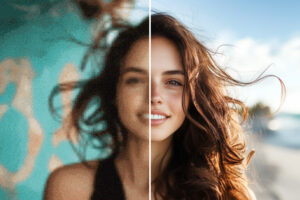
In short, ImgLarger helps your visuals perform better — both for users and search engines.
FAQ – ImgLarger.com
Q1: What makes ImgLarger different from regular image resizers?
Unlike normal resizing tools that stretch pixels, ImgLarger uses AI reconstruction to rebuild details, resulting in clearer, sharper images.
Q2: Is ImgLarger free to use?
Yes, it has a free tier with limited features, but you can upgrade to access higher resolutions and batch processing.
Q3: Can I use ImgLarger on my phone?
Absolutely. ImgLarger works on any device with an internet browser, including smartphones and tablets.
Q4: Are my uploaded images private?
Yes. Images are processed securely and deleted automatically within 24 hours.
Q5: What file formats does ImgLarger support?
You can upload JPG, PNG, and WebP files.
Q6: How long does it take to process an image?
Most images are enhanced within a few seconds to one minute, depending on file size and internet speed.
Final Verdict: Should You Use ImgLarger in 2025?
If you’re looking for a reliable, fast, and easy-to-use AI image upscaler, ImgLarger.com is one of the best options on the market. It’s perfect for creators, businesses, and everyday users who want professional-looking visuals without investing in complex software.
With its smart AI algorithms, quick processing time, and affordable pricing, ImgLarger remains a top choice for anyone who values image quality.
In summary:
- Excellent for enhancing blurry or small photos.
- Affordable and secure.
- Easy for anyone to use.
If you want to transform your images instantly, head to ImgLarger.com
and try it youredelf today.
You may read this : is-tweakvip-com-safe