

In the vast and often overwhelming world of consumer electronics, the tablet market occupies a unique space. It’s a battlefield where tech titans like Apple and Samsung clash, with premium devices boasting staggering price tags. But what about the average user? The student on a tight budget, the casual streamer, the grandparent who just wants to video call their family? For this massive audience, the budget tablet segment is a lifeline, and it’s here that brands like Magch have carved out a niche.
The Magch tablet is a name you’ll frequently encounter on e-commerce platforms like Amazon. It promises the core functionalities of a tablet—web browsing, video streaming, light gaming, and reading—at a price that seems almost too good to be true. This inevitably leads to a critical question: Is the Magch tablet a hidden gem for the cost-conscious, or is it a bargain-bin device doomed to disappoint?
This extensive review aims to be your definitive guide. We will dissect the Magch tablet from every angle, exploring its design, display performance, hardware capabilities, software experience, camera quality, and battery life. We will delve into who this device is truly for and, just as importantly, who should steer clear. By the end of this deep dive, you will have all the information needed to decide if the Magch tablet deserves a spot in your life.
Jump To
ToggleUnboxing and First Impressions: Setting Expectations
The unboxing experience of a Magch tablet is a clear indicator of its position in the market. Don’t expect the sleek, minimalist packaging of an iPad. You’ll typically find a simple cardboard box containing the tablet itself, a charging adapter, a USB cable (most often Micro-USB, a telltale sign of its budget nature), and sometimes a basic user manual. The absence of headphones or a protective case is standard and should be expected.
Picking up the tablet for the first time, the immediate sensation is one of lightweight practicality. Magch tablets are not crafted from premium materials like aluminum or glass. Instead, they utilize durable plastic for the chassis. This isn’t necessarily a negative; it makes the device less slippery and more resistant to minor bumps and drops. The build quality is generally acceptable for the price—it feels sturdy enough for daily use but lacks the “premium” heft of more expensive models.
The bezels surrounding the screen are noticeably thick by modern standards. While this might look dated compared to edge-to-edge displays, it serves a functional purpose on a budget device: it provides a comfortable place to hold the tablet without accidentally triggering touchscreen inputs. The button placement is typically straightforward, with a power button and volume rocker within easy reach. Overall, the first impression is one of a no-frills, functional device designed for practicality over prestige.
Analyzing the Display: The Window to Your Content
The display is arguably the most crucial component of any tablet, as it is the primary interface for all interactions. Magch tablets typically feature screens ranging from 7 inches to 10 inches, with a resolution that often maxes out at 1280 x 800 pixels (HD). It is vital to manage your expectations here. This is not a Retina display, nor is it an OLED panel with inky blacks and vibrant colors.
Clarity and Sharpness: On a 10-inch model, a 1280×800 resolution translates to a pixel density of approximately 150 PPI (Pixels Per Inch). For comparison, an iPad Air sits well above 260 PPI. What does this mean in practice? Text will not be razor-sharp, and you may notice a slight fuzziness when reading small fonts for extended periods. Icons and images will lack the crispness found on higher-end devices. However, for casual web browsing, watching YouTube videos, or checking social media, the resolution is perfectly serviceable.
Color Reproduction and Viewing Angles: The panels used in Magch tablets are almost always TN (Twisted Nematic) or basic IPS (In-Plane Switching). Lower-end models with TN screens will suffer from significant color shifting and contrast loss when viewed from even slight angles. If you opt for a model with an IPS panel, the viewing angles will be much better, allowing you to share the screen with someone sitting next to you without the image degrading completely. Colors are generally acceptable but tend to be less saturated and accurate. Don’t expect to do any serious photo editing on this display.
Brightness: Another common limitation is peak brightness. Magch tablets often struggle in brightly lit environments, especially outdoors. Achieving comfortable visibility in direct sunlight is nearly impossible. For indoor use under normal lighting conditions, the brightness is adequate, but it’s a factor worth considering if you plan to use it in various settings.
In summary, the Magch tablet’s display is functional. It gets the job done for its intended purposes but falls short in delivering a visually stunning experience. It’s a window to your content, but don’t expect a crystal-clear panoramic view.
u may read this : Ezzocard
Performance and Hardware: The Engine Under the Hood
When you’re dealing with a tablet in this price range, the internal hardware is where the most significant compromises are made. Magch tablets are typically powered by entry-level processors from manufacturers like Rockchip or Allwinner, paired with a modest amount of RAM—usually 2GB or 3GB.
Processing Power: The CPU and GPU combination is designed for basic tasks. Navigating the Android interface, launching apps like Gmail or Chrome, and playing locally stored videos is handled without much issue, albeit with occasional stutters. However, when you start multitasking (e.g., having a browser with multiple tabs open while listening to music and receiving notifications), the limitations become apparent. Apps may reload when switching between them, and overall system responsiveness can slow down.
Gaming Capabilities: Let’s be clear: the Magch tablet is not a gaming tablet. It can handle casual 2D games like “Candy Crush,” “Subway Surfers,” or simple puzzle games reasonably well. However, attempting to play graphically intensive 3D titles like “Genshin Impact” or “Call of Duty: Mobile” will be a frustrating experience. You will have to set the graphics to their lowest settings, and even then, you can expect significant frame rate drops and lag.
RAM Management: With 2GB of RAM, the device is constantly juggling active processes. This is the primary cause of app reloads and a less-than-smooth multitasking experience. A model with 3GB of RAM offers a noticeable, though not revolutionary, improvement in keeping a few apps ready in the background.
Storage and Expansion: Internal storage is another area of compromise, often starting at 32GB. Fortunately, nearly all Magch tablets come with a microSD card slot, allowing you to expand storage cheaply and significantly. This is a major advantage for storing a large media library, documents, and apps that support external storage. If you purchase a Magch tablet, buying a reputable microSD card should be at the top of your accessory list.
Software and User Experience: The Android You Know, With Some Quirks
One of the appealing aspects of Magch tablets, and Android tablets in general, is the familiar software environment. These devices typically run a relatively clean version of Android, often an older version like Android 11 or 12. It’s important to check the specific model’s OS version before purchasing.
User Interface: The experience is very close to stock Android, which is a good thing. It’s intuitive, easy to navigate, and comes with essential Google apps and services pre-installed, including the Google Play Store. This gives you access to the vast ecosystem of Android applications. However, the software experience is not without its flaws.
Performance Quirks: As mentioned in the hardware section, the software can feel sluggish at times. Animations might not be perfectly smooth, and there can be a slight delay between tapping an icon and the app launching. These are the trade-offs for the low price.
Long-Term Software Support: This is a critical consideration. Budget tablet manufacturers like Magch are not known for providing regular software updates or security patches. The version of Android your tablet ships with is likely the version it will remain on for its entire lifespan. This can pose potential security risks over time and means you’ll miss out on new features from newer Android versions. For a casual user who sticks to well-known apps, this may be an acceptable risk, but it’s a significant drawback for the security-conscious.
Bloatware: Some models may come with pre-installed apps that cannot be uninstalled. These are usually harmless but can take up valuable storage space and occasionally display advertisements. The level of bloatware varies from model to model.
Camera Quality: Managing Expectations for Photos and Video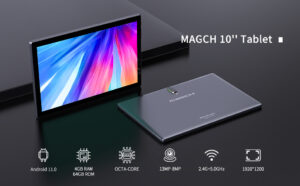
If you are looking for a tablet to be your primary camera, you need to look elsewhere. The cameras on the Magch tablet are strictly utilitarian and rank among its weakest features.
Rear Camera: The rear-facing camera, often in the 5MP to 8MP range, is suitable for one thing: scanning QR codes. Photos taken in good lighting are soft, lack detail, and suffer from poor dynamic range. In lower light, the results are virtually unusable, filled with noise and blur. There is no flash on most models.
Front-Facing Camera: The front camera, typically a 2MP sensor, is designed for video calls. It will suffice for apps like Zoom, Google Duo, or Facebook Messenger calls, provided you are in a well-lit room. The video quality is grainy and the frame rate can be low, but it allows you to be seen, which is its core function. Don’t expect to take flattering selfies or conduct professional video conferences with it.
In essence, view the cameras as a convenience feature for communication, not for photography. For any meaningful photos, your smartphone, even an older model, will be vastly superior.
Battery Life and Charging: The Marathon Runner
Battery life is an area where the Magch tablet often surprises positively. Equipped with large capacity batteries (often between 5000mAh and 8000mAh) and paired with low-power components, these tablets are designed for endurance.
In real-world usage, you can expect a full day of mixed use—including several hours of video streaming, web browsing, and reading—on a single charge. For more casual users, the tablet might even last two days. This excellent battery life is one of its strongest selling points, making it a reliable companion for long trips, lazy couch sessions, or as a dedicated media device for a child.
The flip side of this is the charging technology. Magch tablets almost universally use older Micro-USB ports instead of the modern, reversible USB-C. Furthermore, they lack support for fast charging. Charging a large battery with a slow, 5W or 10W charger can take several hours—often 4 to 6 hours for a full cycle from empty. It’s best to develop a habit of charging it overnight.
Connectivity and Audio: Completing the Experience
A tablet is more than just a screen and a battery; its peripheral features contribute significantly to the overall experience.
Connectivity Options: Standard connectivity includes Wi-Fi (typically 2.4GHz, with some models supporting 5GHz for faster speeds) and Bluetooth. Some Magch tablet models also offer cellular connectivity with a SIM card slot for mobile data, which can be a huge advantage for staying connected on the go. Be sure to check the product specifications if this is a requirement for you.
Audio Performance: Most Magch tablets feature a single, bottom-firing speaker. The audio quality is, as you might expect, basic. It gets loud enough for personal viewing but lacks any bass and can sound tinny at higher volumes. For a satisfying audio experience, especially for movies and music, a pair of wired or Bluetooth headphones is highly recommended. The headphone jack, which is still present on most models, is a welcome feature for many users.
Who Is the Magch Tablet For? Identifying the Ideal User
After this thorough examination, the profile of the ideal Magch tablet user becomes very clear. This device is a purpose-driven tool for specific audiences.
The Budget-Conscious Student: For a student who needs a device primarily for accessing online learning portals, reading PDFs, taking notes with a compatible stylus (if supported), and light web research, the Magch tablet is a cost-effective solution. Its long battery life is perfect for a full school day.
The Casual Home User and Media Consumer: If your primary activities are watching Netflix, YouTube, Amazon Prime Video, and browsing social media sites like Facebook or Pinterest from the comfort of your sofa or bed, the Magch tablet fulfills this role admirably. It’s a modern-day “couch computer.”
The Younger Generation (with parental controls): As a first tablet for a child, the Magch tablet is a compelling option. It’s inexpensive, durable enough to handle minor accidents, and its performance limitations are less of an issue for kids’ games and apps. Pair it with a sturdy case, and it becomes a dedicated device for entertainment and learning.
The Elderly User: For seniors looking to get online for video calls with family, reading news, looking at photos, and using simple apps, the Magch tablet offers a large, intuitive touchscreen interface at an accessible price point. The simplicity of Android is easier to grasp than a full desktop computer.
Who Should Avoid the Magch Tablet? Understanding the Limitations
Just as important as knowing who it’s for is knowing who should look at other options. The Magch tablet is not a one-size-fits-all device.
The Power User and Multitasker: If you need to run multiple demanding apps simultaneously, work with large spreadsheets, or edit documents on the go, the performance limitations will be a constant source of frustration.
The Mobile Gamer: For anyone who enjoys playing the latest 3D mobile games, the underpowered processor and GPU will not provide a satisfactory experience. Invest in a device with a more capable chipset.
The Creative Professional: Photographers, artists, and video editors looking for a portable creative canvas will find the display quality and processing power wholly inadequate for their needs.
The Security-Conscious Individual: The lack of guaranteed software and security updates is a deal-breaker for anyone who prioritizes their digital security and privacy.
Final Verdict: A Calculated Compromise
The Magch tablet exists in a world of calculated compromises. It sacrifices premium build materials, high-resolution displays, powerful processors, and modern software support to achieve one primary goal: an incredibly low price.
Is it worth buying?
The answer is a resounding “yes,” but only if you fall squarely into its target audience. If your needs are basic, your budget is tight, and you understand and accept its limitations, the Magch tablet represents exceptional value for money. It successfully delivers the core tablet experience—internet, video, apps, and books—without any pretensions of being something it’s not.
It is not a “cheap iPad.” It is a functional, pragmatic tool that serves a specific purpose wonderfully well. For the student, the casual user, the child, or the grandparent, it can be a gateway to the digital world, and for that alone, it deserves recognition. Just remember, you get what you pay for, and with the Magch tablet, you are paying for simplicity and function, not flair and power.